SlipTap
Skip mousing to AudioSuite.
Run Render, Learn or Send in your open AudioSuite window from a panel button or hotkey.
$29
Full 14-day trial included. Buy once, use forever.
How it works
Open your AudioSuite plug-ins, assign them to buttons, then run them from a button or hotkey.
1Open
Open your AudioSuite plug-ins in Pro Tools as usual.
2Assign
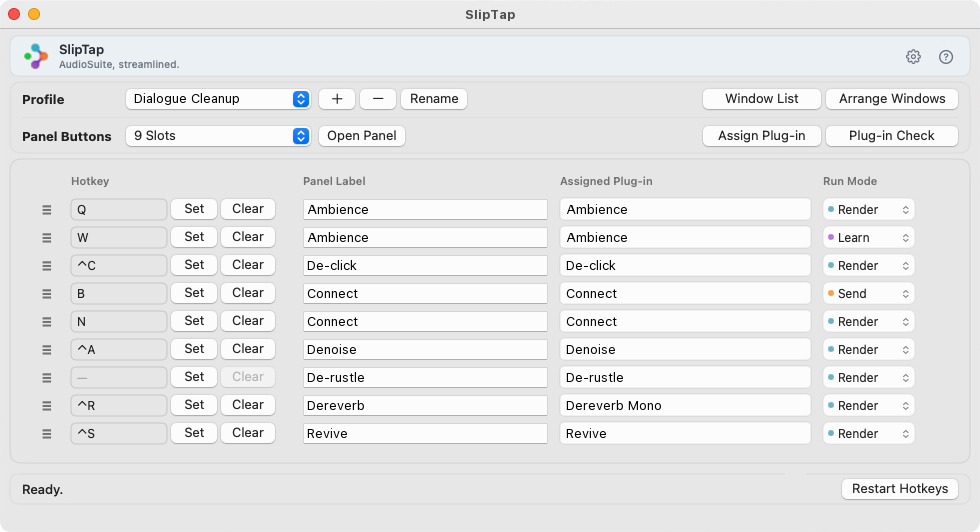
In Assign Plug-in, connect each open plug-in to a panel button, and add a hotkey if you like.
3Trigger
Click a panel button or press a hotkey — Render, Learn or Send runs in the open plug-in window.
Active only in Pro Tools
Hotkeys work only while Pro Tools is the front app. In text fields and Open/Save dialogs they don't run, so your typing goes through normally.
Stop mousing between plug-in windows.
Post-production, dialogue and mixing engineers run the same AudioSuite processing over and over every day — find the right window among the open plug-ins, click, render, repeat.
How engineers use it
From repetitive processing to window management and profile switching — shown in real Pro Tools sessions.
Repetitive processing from panel buttons and hotkeys
Any plug-in (de-noise, de-click and more) can be assigned to SlipTap panel buttons and hotkeys. Mid-session, run what you need straight from them — no hunting through plug-in windows.
Learn or Send, separate from Render
Assign the same plug-in to two buttons with different Run Modes. With Ambience Match, Learn first, then Render to fill the gap. With a plug-in that hands clips to an external editor, like RX Connect, Send the clip, edit it there, then Render back in Pro Tools. Either way, it runs from a button or hotkey — no trips to the plug-in window.
Find, arrange and open plug-ins
Find a plug-in window in the list and bring it to the front. Tile or cascade cluttered windows. And for plug-ins assigned in SlipTap but missing from the list, Plug-in Check finds them and opens them in one go.
Profiles for every workflow
Save button sets and layouts as profiles for each kind of work — dialogue editing, ADR, sound design — and switch profiles as needed. File > Create Full Profile Backup saves every profile to one file, and SlipTap also keeps three rotating automatic backups, updated whenever profiles are saved or the app closes.
Requirements
| System | macOS 13.5 (Ventura) or later · Apple Silicon & Intel (universal) · ~30 MB |
|---|---|
| Pro Tools | Avid Pro Tools with AudioSuite support |
| Permissions | Accessibility (reads Pro Tools windows and operates AudioSuite) · Input Monitoring (detects hotkeys) |
| Distribution | Direct download — Developer ID signed & notarized DMG. |
Get SlipTap
Try every feature free for 14 days. To keep using it, enter your license key and purchase email in Preferences → License in the same app (internet required) — no reinstall needed.
Buy a licensePayments securely handled by Lemon Squeezy